Strategic use of a free project management tool: How to design a scalable setup without paying for licenses
Learn exactly how to design, configure and scale a free project management tool for startups and growth teams without hitting hard limits after 6-12 months.

Rasmus Rowbotham
Founder of Foundbase and experienced entrepreneur with over 10 years of experience in building and scaling businesses.
What a 'free project management tool' really means in practice
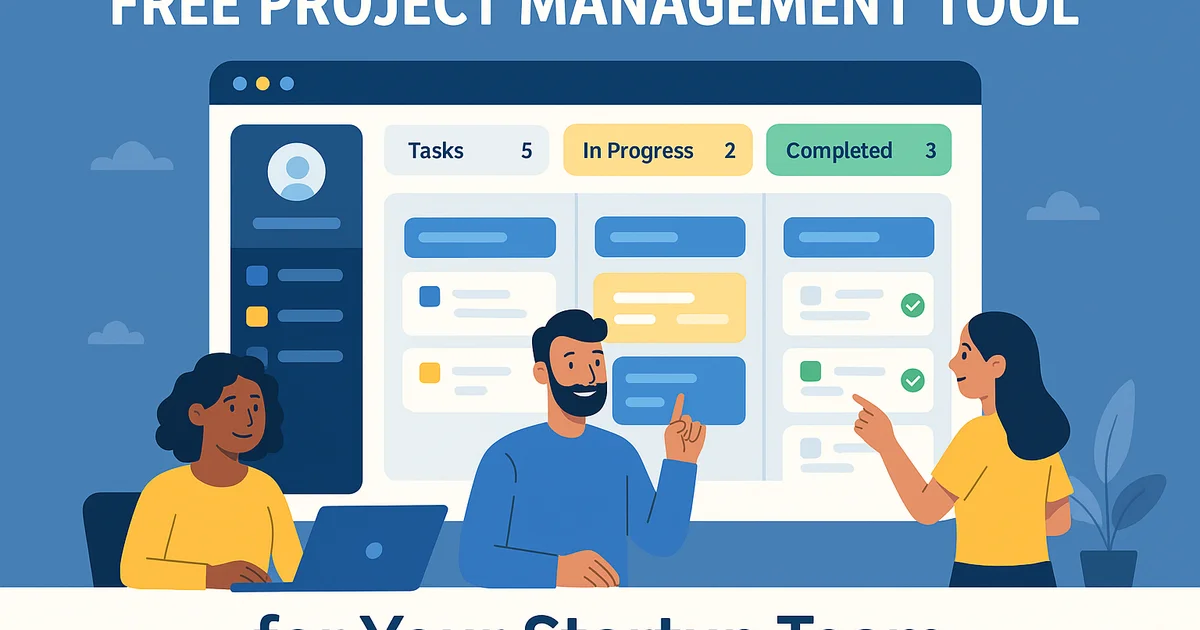
A free project management tool is a digital system for tasks, projects and collaboration where you can start without license costs, typically via a freemium plan with limits on users, boards, automations or storage. The key is not just which tool is chosen – but how the setup is designed to use the free limits strategically.
- Most freemium plans typically support 5-15 users, 1-10 active boards/projects and 100-1000 tasks before hard limits appear (sources: [https://asana.com/pricing](https://asana.com/pricing), [https://trello.com/pricing](https://trello.com/pricing), [https://clickup.com/pricing](https://clickup.com/pricing)).
- Automations and advanced permission types are often limited or missing, which forces process discipline instead of relying on technical guardrails.
- Many free plans allow unlimited read access for guests but limit editing users – critical for B2B teams that involve clients.
- Storage limits (for example 100 MB to 1 GB) make it necessary to manage files via dedicated tools like Google Drive or OneDrive instead of uploading everything into the project tool.
- Teams that define a clear project structure from day one typically reduce time spent on status meetings by 20-40 %, because everything lives in one shared system (see also the general principles in [https://foundbase.io/guides/project-management/de-10-stoerste-fejl-startups-laver-med-projektstyring](https://foundbase.io/guides/project-management/de-10-stoerste-fejl-startups-laver-med-projektstyring)).
When to use vs. avoid a free project management tool
When a free solution makes sense
- You are a small team (2-15 people) that mainly needs task management, simple projects and shared visibility.
- You have a restricted budget for the first 6-12 months and want to test structure and workflows before paying for licenses.
- You run a limited number of core projects at the same time (for example 3-8 active client projects or product sprints).
- You are prepared to compensate for missing automations with simple process rules and fixed meeting rhythms.
- You prefer to experiment with your project method before committing deeply to a specific platform (tool comparison details are covered in [https://foundbase.io/guides/project-management/gratis-alternativer-til-monday-com](https://foundbase.io/guides/project-management/gratis-alternativer-til-monday-com)).
When you should go straight to a paid solution
- You manage projects with heavy compliance, formal approvals or audit requirements (for example pharma, finance, public tenders).
- You have 20+ people who all need to edit, comment and update tasks daily.
- You need advanced approval flows, SLA tracking or deep integrations with CRM/finance from day one.
- You have strict requirements for data retention, logging and history that are usually paywalled.
- You already know that you will run more than 10-15 parallel high-complexity projects all year long.
Spreadsheets vs. freemium tool vs. all-in-one platform
Below is a practical comparison if you are deciding between three common ways to build a free project setup.
| Option | Quick verdict | Best for |
|---|---|---|
| Spreadsheet (Google Sheets, Excel Online) | Great for prototypes, poor for scaling and collaboration | Solo founders, early experiments, small project portfolio |
| Freemium tool (Trello, Asana, ClickUp) | Best balance between structure, collaboration and flexibility | Startups and small teams with growth ambitions |
| All-in-one platform (Notion, Airtable free plans) | Very flexible, but needs strong structure to avoid chaos | Product teams and knowledge-intensive companies |
Feature vs. option – what to prioritise in a free setup
| Feature | Option | Notes |
|---|---|---|
| Task view | Kanban board | Most intuitive for mixed teams; should be the default in free setups |
| Planning | List with start date, due date and owner | Gantt charts typically require paid plans – use dates and simple milestone tags instead |
| Documents | Links to Google Drive/OneDrive | Do not burn limited storage; keep only critical files in the tool |
| Reporting | Simple dashboards in spreadsheets | Export data from the free tool and build monthly reports in a separate sheet |
| Automations | Manual setup plus weekly routines | Free plans offer few or no automations; replace them with checklists and calendar reminders |
Three key trade-offs of free project management tools
1. Structure vs. flexibility
A free tool limits the number of boards, projects and fields. This pushes you towards standardising the structure (for example one master board per business area), but lowers flexibility for teams that want highly customised setups. The trade-off: less freedom, more consistency.
2. Process discipline vs. automations
Without advanced automations (status changes, automatic assignment, SLA rules) humans must uphold the processes. This increases the need for clear rules and fixed rhythms, but also ensures that the team fully understands the method before anything is automated. The trade-off: more discipline now, fewer mistakes later.
3. Scaling vs. history
Many free tools limit history or the number of active boards. It means older projects may need to be archived manually to spreadsheets or PDF. The trade-off: some click-through history is lost, but focus on the current pipeline is improved.
Before/after: How a free setup changes the daily reality
Before – fragmented workday
- Tasks live in email, Slack, personal to-do apps and spreadsheets.
- Status meetings are used to figure out what is even going on.
- Clients ask for updates and answers depend on who they happen to reach.
- Project management feels like constant firefighting.
After – one free tool as the single source of truth
- All tasks and projects live on the same board with clear owners and due dates.
- Status meetings start inside the tool and focus on decisions, not data collection.
- Clients can receive predictable updates because pipeline and deadlines are visible.
- The team works in fixed columns and tags; new hires can onboard quickly.
To avoid the most common mistakes in this transition, it is useful to combine this guide with the implementation principles described in [https://foundbase.io/guides/project-management/implementering-projektstyringsvaerktoej-startup-workflow-skabeloner-regler](https://foundbase.io/guides/project-management/implementering-projektstyringsvaerktoej-startup-workflow-skabeloner-regler).
Core framework: One master board for the whole business
Instead of creating a new board for every project (which quickly hits free plan limits), it is often far more robust to design one master board per business area. Below is a concrete example of a master board for client projects in a free tool.
Standard columns
- Backlog – ideas and non-prioritised tasks.
- Next up – prioritised tasks ready for the next sprint/week.
- In progress – current work.
- Blocked – tasks waiting for input from a client or colleague.
- Ready for review – ready for approval.
- Done – completed tasks (for example archived monthly to stay within limits).
Essential fields (custom fields or labels)
- Project/client – use fields instead of separate boards to group work.
- Owner – always one accountable owner per task.
- Due date – for expectation management, especially with external clients.
- Estimate (hours or story points) – needed for capacity planning.
- Priority (High/Medium/Low) – makes weekly planning efficient.
Three practical setups for free project management tools
Setup A: Focus and task board for solo founders
Goal: Minimise context switching and keep focus on a small number of critical initiatives at a time.
- Structure: One board with columns Ideas, This week, Today, In progress, Done.
- Rule: Max 3 cards in In progress to limit multitasking.
- Routine: Every Friday, move relevant cards from Ideas to This week.
More about focus, tempo and task discipline for founders is covered in [https://foundbase.io/guides/project-management/opgavestyring-for-ivaerksaettere-fokus-tempo-overblik](https://foundbase.io/guides/project-management/opgavestyring-for-ivaerksaettere-fokus-tempo-overblik).
Setup B: Sprint-based product development in small teams
Goal: Run 1-2 week sprints without heavyweight scrum software.
- Structure: One board per product team, with a field for Sprint name (for example Sprint 12, Sprint 13).
- Rituals: Sprint planning (Monday), daily 15-minute standup, sprint review and retro.
- Limitations: Sprint history is handled by filtering on the sprint field; older sprints can be exported to PDF or spreadsheet.
Setup C: Client projects in B2B agencies
Goal: Handle 5-20 client projects in parallel without hitting free plan limits.
- Structure: One master board for all clients; fields for Client, Project phase and Retainer/project type.
- Client communication: A standard comment template for status updates in the tool that is copied into email.
- Overview: Weekly reporting generated by exporting to a spreadsheet and building a simple pipeline view.
Step-by-step: Configure a free project management tool in 2 days
Day 1 – structure and basic configuration
- Step 1: Choose a tool based on interface and freemium limits (see pricing pages such as [https://asana.com/pricing](https://asana.com/pricing), [https://trello.com/pricing](https://trello.com/pricing) and [https://clickup.com/pricing](https://clickup.com/pricing)).
- Step 2: Define 3-5 columns that match how you work – avoid 10+ columns on day one.
- Step 3: Create 3-5 custom fields (or labels) for project/client, priority, owner and due date.
- Step 4: Build 10-20 example tasks so the team can see real cases and understand the fields.
- Step 5: Decide archive rules: when Done tasks are moved out and where old projects are stored (for example Google Drive).
Day 2 – process, rules and governance
- Step 6: Define a meeting rhythm (for example weekly planning, daily 15-minute status, monthly review).
- Step 7: Write 5-10 simple rules: one owner per task, no task without due date, no task moves columns without a comment, and so on.
- Step 8: Onboard the team in a 60-minute workshop where real tasks are moved into the tool.
- Step 9: Assign ownership – who owns the board structure and who may create new fields or labels.
- Step 10: Schedule a follow-up meeting in 14 days to adjust structure and rules.
If you want to go deeper into task management itself, you can combine this with the principles presented in [https://foundbase.io/guides/project-management/opgavestyring-komplet-guide-til-effektiv-planlaegning-overblik-samarbejde-2025](https://foundbase.io/guides/project-management/opgavestyring-komplet-guide-til-effektiv-planlaegning-overblik-samarbejde-2025).
Specs and typical limits in free plans
The table below is a generalised picture based on public pricing pages (details change over time – always check the current pages).
| Spec | Typical free plan | Notes and sources |
|---|---|---|
| Max number of users | 5-15 active users | Examples: Asana Basic, Trello Free, ClickUp Free (see [https://asana.com/pricing](https://asana.com/pricing), [https://trello.com/pricing](https://trello.com/pricing), [https://clickup.com/pricing](https://clickup.com/pricing)) |
| Boards/projects | Limit per workspace or feature | Usually enough for 1-3 master boards and 3-5 experimental boards |
| Storage | 100 MB to 1 GB | Keep critical files in the tool, everything else in external storage |
| Automations | 0-100 actions per month | Rarely sufficient for full-scale automation |
| Support | Help centre and community | Direct support is usually reserved for paid tiers |
Three concrete options – with trade-offs, risks and who they fit
Option 1: One central master board for everything
Benefit: Maximum overview, minimum tool sprawl. Suitable for teams that want a single source of truth for all projects.
Trade-offs: The board can become heavy with many cards; requires strong discipline in fields and filters.
Risks: Without clear archive rules, the board becomes unmanageable after 3-6 months.
Best for: Startups with 3-15 people who mainly work on one product or one type of client engagement.
Option 2: One board per business area
Benefit: Better separation between for example marketing, product and delivery while staying within free limits.
Trade-offs: More context switching between boards; requires shared field and label standards.
Risks: If each area is allowed to invent its own structure, company-wide standards disappear.
Best for: Growth teams with clear domains and emerging product/market fit.
Option 3: Hybrid – master board plus temporary project boards
Benefit: The master board is used for overview and portfolio management; temporary project boards are used for large initiatives (for example major releases or campaigns).
Trade-offs: Needs clear criteria for when a separate project board is allowed and when work only lives in the master board.
Risks: Without rules, projects spread across too many boards and free limits are hit quickly.
Best for: Teams with a mix of small operational tasks and a few heavy projects.
Risks that should be planned for
- Vendor lock-in: Free plans can change or move features behind paywalls. Always keep an export strategy (CSV, PDF).
- Data quality: Without governance for fields, naming and labels, analytics will be hard – create a short naming standard from day one.
- Scaling shock: When the team grows from 10 to 25 people, a free plan often collapses – plan the move to a paid solution 3-6 months before the need becomes critical.
Decision block: Which path should you choose?
If you are a beginner with a small team (2-5 people):
Start with Setup A (focus board) on a single master board. After 4-6 weeks, add simple fields for priority and estimation.
If you are a startup with limited budget but strong growth ambitions:
Choose Option 2 (one board per business area) and use fields to enforce common standards. From the beginning, plan how migration to a paid tool will work once product/market fit is reached.
If you need fast adoption in an existing team:
Choose Option 3 (hybrid). Configure a strong master board and allow temporary project boards for major initiatives. Use the experience to later select a paid platform – and leverage the mistake patterns described in [https://foundbase.io/guides/project-management/de-10-stoerste-fejl-startups-laver-med-projektstyring](https://foundbase.io/guides/project-management/de-10-stoerste-fejl-startups-laver-med-projektstyring) to avoid common pitfalls.
90-day action plan for getting maximum value from a free project management tool
Day 0-7: Design and alignment
- Select the tool and configure the first master board.
- Define 3-5 columns and essential fields.
- Create a one-page playbook with usage rules.
- Run a 60-minute workshop where everyone moves their existing tasks into the system.
Day 8-30: Stable operation and small improvements
- Hold a weekly 20-30 minute retro: which columns, fields and rules do not work?
- Optimise naming standards for projects, clients and labels.
- Test simple reporting: export data and build a basic capacity overview in a spreadsheet.
Day 31-60: Scale structure and introduce more boards
- Add boards for other business areas (for example marketing or sales) using the same standards.
- Introduce a monthly portfolio review rhythm.
- Identify which free plan limits start to hurt (users, automations, storage).
Day 61-90: Prepare scaling or migration
- Decide whether the free plan is sufficient for the next 6-12 months.
- If not, define must-have features for a future paid platform.
- Design a simple migration plan (export, data cleanup, new structure) and schedule a cutover date.
- Ensure that processes and rules are documented so they can be moved easily into the new tool.
Next step: From ad hoc coordination to a free but professional project system
A free project management tool is not a strategy on its own – it is scaffolding for the project method behind it. When structure, fields and rules are in place, the tool can function as a professional project system even without a license budget. If you want to see how a free tool can be designed specifically for startups and growth teams, explore Foundbase here: Free project management tool by Foundbase.
Frequently asked questions
Q: How long can a startup realistically rely on a free project management tool?
For most startups, a free project management tool can cover core needs for 6-18 months, depending on team size and complexity. If the team stays below roughly 10 users and works on a limited number of core projects at any given time, limits on users, boards and automations are usually manageable. As soon as you approach 15-20 active users, 10+ parallel projects or start to struggle with missing automations and reporting, it is typically time to plan a migration to a paid platform. Monitoring pain points over time allows you to schedule the transition before the tool becomes a bottleneck.
Q: How can multiple teams share the same free project management tool without creating chaos?
The main lever is a shared standard for structure and naming. Start with one master board per business area (for example product, marketing, delivery) but reuse the same columns and fields across boards. Define a naming standard for projects, clients and labels, and appoint a system owner who approves new fields and boards. Combine this with a monthly portfolio review where old cards are cleaned up, completed projects archived and early signs of tool sprawl are addressed. This way, you can exploit the free plan without ending up with a fragmented setup.
Q: How should files and documents be handled when storage is limited on the free plan?
The most robust strategy is to treat the project tool as a navigation layer, not a file archive. Use fields and descriptions to link to documents stored in Google Drive, OneDrive or similar instead of uploading large files directly. Define a simple folder structure per client or project in your file system and use consistent links from tasks to relevant folders and documents. Store only critical images or small files inside the project tool. This reduces the risk of hitting storage limits and makes future migrations much easier.
Q: What is the easiest way to move from a free project management tool to a paid platform later?
A smooth migration depends on clean and consistent data. First, create an overview of boards, fields and labels so the structure can be mirrored in the new platform. Then export active projects and tasks to CSV and import them into the new tool, often with a temporary mapping between old and new fields. Completed projects can be archived as PDFs or spreadsheet extracts instead of being moved. Finally, run a 2-4 week transition period where the old system is read-only, while all new work is created in the new tool. This approach avoids double work and preserves essential history.
Q: What are the most common mistakes when teams run complex projects on a free plan?
Typical failure modes include: too many boards without a clear relationship, inconsistent columns and fields across teams, no ownership of cleanup and archiving, and missing rules for how tasks move across statuses. Many teams also underestimate reporting needs: when leadership asks for portfolio overviews, the underlying data is often too unstructured to export and analyse. These issues can be prevented by deliberately designing a master board structure, setting clear rules and building a simple governance model before the tool is opened up to the whole organisation.
Related guides

Project management tools comparison: Find your match
Discover the best project management tools for your needs. Our guide helps you choose the right tool to enhance your project management.
Rasmus Rowbotham
Project management for digital nomads: Expert guide
Discover how to effectively manage projects as a digital nomad. Gain insights into tools and tips for productivity and collaboration on the go.
Rasmus Rowbotham
Remote project management tools: boost productivity
Discover the top remote project management tools to enhance collaboration within your team. Learn how to optimize productivity effectively.
Rasmus Rowbotham