CRM for Beginners: How to Get Started Quickly and Easily with Your First Sales Pipeline
Learn how to quickly and easily set up a CRM that organizes your leads, deals, and sales processes from day one.

Rasmus Rowbotham
Founder of Foundbase and experienced entrepreneur with over 10 years of experience in building and scaling businesses.
What is CRM – and why simplicity matters
CRM (Customer Relationship Management) is more than software – it’s a structured workflow for managing customers, leads, and deals. For beginners, the goal is simplicity: a system that saves time, not adds work. The easiest CRM setups focus on visual pipelines, automatic reminders, and clean data entry.
Step 1: Build a simple pipeline
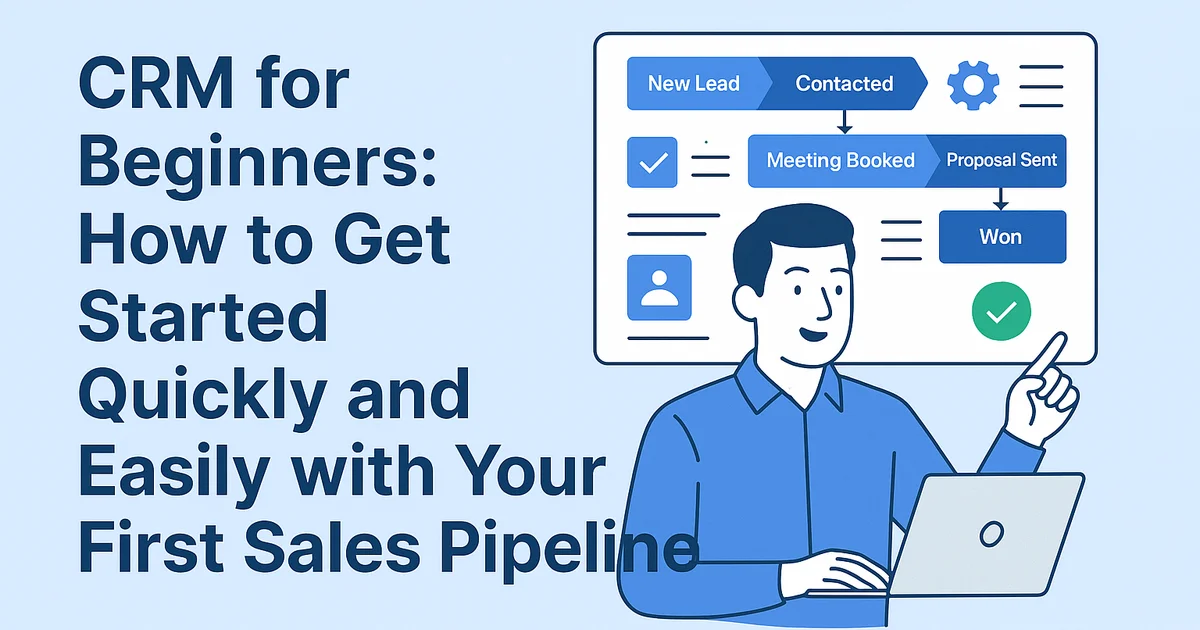
Start with a 5-stage pipeline: 1) New lead, 2) Contacted, 3) Meeting booked, 4) Proposal sent, 5) Won/lost. In a tool like Foundbase, you can create this in minutes. Each stage should have one clear action – for example, 'Send quote' or 'Schedule follow-up'.
Step 2: Keep fields minimal
Use only essential fields such as 'Source', 'Deal value', and 'Next step'. Tag leads by type ('Website', 'Referral', 'Social ad') so you can segment later. Overcomplicated setups slow you down, while lean data entry ensures daily use.
Step 3: Automate follow-ups
Automations are what make CRM powerful. Set reminders if no contact has been made after 3 days. Send thank-you emails automatically after meetings. Small, simple automations keep your pipeline alive without manual effort.
Step 4: Treat your CRM like a daily planner
Your CRM should tell you what to do each morning. View all open tasks, deals, and follow-ups directly on the dashboard. This turns CRM from passive storage into an active workflow engine that drives sales.
Step 5: Keep it clean and simple
Dedicate 15 minutes a week to maintenance: delete duplicates, archive lost deals, and update contact info. Clean data equals accurate forecasts and fewer missed opportunities.
Step 6: Use dashboards for clarity
Track the essentials: 1) New leads per week, 2) Conversion rate per stage, 3) Lost deals. Simple dashboards reveal where you’re losing momentum and where to focus next.
Step 7: Connect your lead sources
Integrate your main channels – website forms, ads, email campaigns – so new leads flow directly into your CRM. This saves time and ensures every contact is logged automatically.
Step 8: Test and evolve
Once your first version runs, use real data to refine it. Identify where follow-ups stall and add automations or alerts. A CRM setup should grow with your business – but it must start simple to be sustainable.
Example: One-hour CRM setup
- Create a 5-stage pipeline
- Import leads from a spreadsheet
- Set 3 follow-up automations
- Add daily task reminders
- Connect your website form
This can all be done in under 60 minutes using Foundbase. The key is starting small and expanding as your process matures.
Conclusion: Simple wins
The best CRM is the one you actually use. Start with structure, follow-ups, and automation – nothing more. Once those habits are built, the system becomes a growth engine rather than an admin burden.
Frequently asked questions
Q: How long does it take to set up a CRM for the first time?
You can set up a functional CRM in under one hour. Focus on creating a simple pipeline, importing contacts, and enabling follow-up reminders.
Q: What are the key features to focus on as a beginner?
Start with the basics: pipeline stages, leads, and tasks. Once these are in place, you can add automations, dashboards, and integrations later.
Q: How do I avoid overcomplicating my CRM?
Keep your setup lean. Limit the number of fields, and clean your data weekly. A simple, consistent structure ensures long-term adoption and success.
Related guides

crm for startup customer success: Boost growth
Discover how crm for startup customer success can enhance your business growth. Implement effective strategies and tools for small teams.
Rasmus Rowbotham
crm customization for startups: Boost efficiency
Learn how to customize your CRM for your startup and enhance efficiency. Get tailored solutions and optimize your business.
Rasmus Rowbotham
Crm customer feedback integration: enhance your strategy
Discover how to integrate customer feedback into your CRM system to enhance customer satisfaction and refine your strategy.
Rasmus Rowbotham